

EMO · LOCAL GUIDE
EMO User Guide
Learn about EMO power, connectivity, interactions and everyday care.
Standard edition Accessories and features depend on the received edition and its original manual.
GO HOME Before using Home Station, confirm power, placement and device compatibility.
01 · GUIDE
Start up and rest
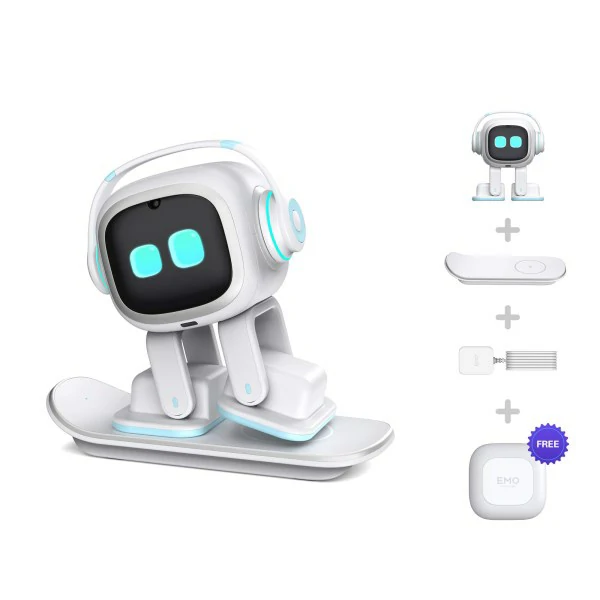
Power the charging skateboard, then align EMO’s foot with its charging area using the magnetic guide to start up.Wait for the normal face before interacting. Say “EMO” and give it time to respond.
Try “EMO, go to sleep” for rest. Sleep is not a power disconnect; use a shutdown option documented in the current app or manufacturer instructions.
Guide image coming soon
02 · GUIDE
Charge on the skateboard
Place the skateboard on a stable, dry desk and use compatible power accessories. Clear the charging area.Position EMO correctly and confirm charging feedback. If it is absent, recheck foot alignment and the power connection.
Keep both robot and charger dry and clear of loose metal. Stop use and contact support if heat, smell or damage is abnormal.
Guide image coming soon
03 · GUIDE
App and network connection
Install the EMO app from your phone’s official app store and enable Bluetooth and the connection permissions it requests.Connect to EMO nearby through the app, then configure 2.4 GHz Wi-Fi. A 5 GHz network is not supported.
First confirm the app sees EMO, then test online functions. Device discovery and Wi-Fi failures are separate: check permissions for the first and network details for the second.
Guide image coming soon
04 · GUIDE
Updates and new features
Check the installed version and available updates in the EMO app. Older manual descriptions do not confirm current service availability.Keep a stable network and sufficient charge. Maintain power as instructed during updating and do not force a restart.
After completion, check movement, touch and voice response. Online services and extras depend on firmware, app and service region.
Guide image coming soon
05 · GUIDE
Safe desktop interaction
Use a spacious, level, preferably light-coloured desk away from edges, liquids and loose objects. The manual discourages rounded table edges.Gently touch the head, place an obstacle in front or lift it carefully to observe reactions. Do not test edge sensing by pushing it toward a drop.
Wake EMO, then try “EMO, dance for me” or “EMO, music”. You can also choose the interactive games available in the app.
Guide image coming soon
06 · GUIDE
Camera and photos
Keep the front lens clean in good light. Face EMO, wake it and try “EMO, take a photo”.Check the result in the app’s photo feature. To introduce yourself, say “EMO, nice to meet you” and give your name when asked.
Get permission from people being photographed. Obstructions, backlighting and distance affect face interaction; do not use it for identity verification.
Guide image coming soon
07 · GUIDE
Smart Light
Check that your bundle includes a compatible Smart Light. The standard-edition name alone does not confirm this accessory is included.Power the light appropriately near EMO. The manual describes automatic Bluetooth discovery without separate Wi-Fi setup for the light.
Wake EMO and try “EMO, turn on the light”. If it does not respond, check power, distance and connection. The light also supports touch control.
Guide image coming soon
08 · GUIDE
Before using Home Station
Home Station is a GO HOME accessory; the standard charging skateboard is not an automatic return-to-charge station.Check accessory compatibility, firmware requirements and the supplied installation guide before placing the station on a stable, level surface.
Follow that station’s instructions for power, play area and return-to-charge setup, and supervise the first attempt. Do not infer pairing or reset controls from the older skateboard manual.
Guide image coming soon
09 · GUIDE
Cleaning and maintenance
Stop activity and remove EMO from its charger. Clean the shell, feet and sensor surfaces with a soft dry cloth.Do not immerse it, spray cleaners or force the servos. Support its body when moving it rather than pulling the headphones or legs.
Keep it dry and away from flames, heat and prolonged direct sun. Check for a clear, safe activity area whenever you return it to the desk.
Guide image coming soon
10 · GUIDE
Troubleshooting and support
For startup or charging failure, check the outlet, power accessory, skateboard cable and foot alignment, watching for screen feedback.For voice failure, reduce background noise and say the name before the command. If only online functions fail, check 2.4 GHz Wi-Fi and the app connection.
For unusual movement, stop interaction and remove obstacles without twisting joints. Save error messages, versions and a short video for support; do not disassemble it.
Guide image coming soon
NEED MORE HELP?