

TP223 Touch Modules Offer Low-Power Switching Through Nonmetal Panels
Reading lead
A Hackaday report describes using inexpensive TP223 capacitive-touch modules as alternatives to mechanical switches in project enclosures. The sensors can detect touch through plastic, glass, or wood, although increasing the panel thickness reduces sensitivity; a smaller touch pad or an external capacitor can also shorten the sensing range. The report says the modules draw less than 2 microamps at rest. Two initially unsoldered jumpers provide four output configurations: the default output goes high while touched, jumper A inverts that behavior, jumper B toggles the output with each press, and using both combines toggling with the opposite default state. A small capacitor on the power supply is suggested to address false triggers. The article notes possible use in 3D-printed designs and as a power switch, but gives no independent measurements or detailed implementation results.
Article body
Image unavailable. Open source image ↗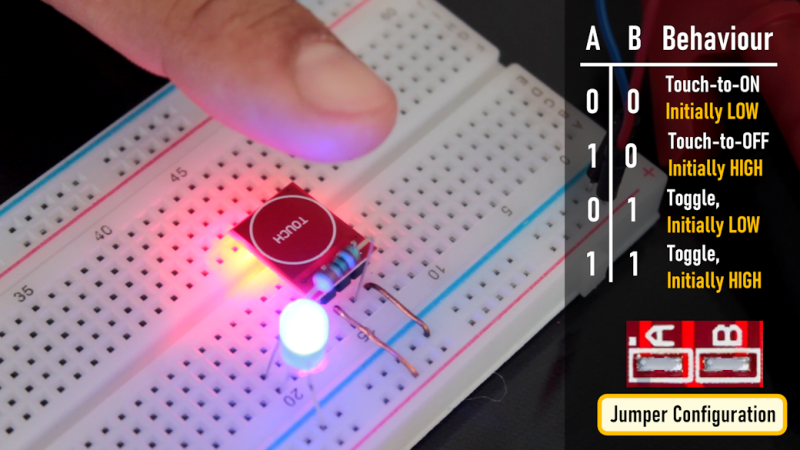
Mechanical and prone to failure, switches can seem quaint these days. Plus, everyone is used to having touch screens on their phones and other devices. So why not use touch sensors on your next project? [Tarantula3] has details on using the TP223 instead of ordinary switches.
These inexpensive modules work through plastic, glass, or wood, opening up many interesting possibilities for building a front panel. Of course, the thicker the surface above the module, the less sensitive the switch is, but that’s not always a bad thing. In particular, you may want to reduce sensitivity anyway. Thicker panels, reducing the size of the touch pad, or adding an external capacitor can reduce the sensor’s range.
You may be worried about eating up batteries with a bunch of electronic switches. But according to [Tarantula3], the modules consume less than 2 microamps at rest. You can configure the modules with our favorite scripting language: solder. There are two jumpers, initially unsoldered, and this results in four possible states. By default, the output goes high when someone is touching the sensor and stays high until they release.
However, you can solder jumper A to invert the output. Jumper B causes the switch output to toggle on each press. Of course, you can also do both jumpers, which toggles but has the opposite default state. If you get false triggers, consider adding a small capacitor to filter the power supply to the module.
These would be great “drop ins” for 3D printing to add switches to your designs. You might even be able to use these as power switches with a little work.
Source: Al Williams ·Hackaday · 2026-10-09T15:30:21.000Z · Read the original article
Why read this
The article provides practical configuration and power details for a touch-sensor module, but offers no independent testing or demonstrated project beyond the described use.
AI score 49 · View scoring rationale
Two-model scores assess source reading value, not factual accuracy. Check this editorial article against the original.
- gpt-6-luna-2026-09-22 · 44
The article provides practical configuration and power details for a touch-sensor module, but offers no independent testing or demonstrated project beyond the described use.
- deepseek-flash · 55
Practical configuration detail for an inexpensive, widely used touch module: jumper modes, sensitivity reduction, and a sub-2-microamp standby claim, though only as an explainer without independent measurement.
Analyzed: 2026.10.10 02:36 UTC
Comments & answers 0